

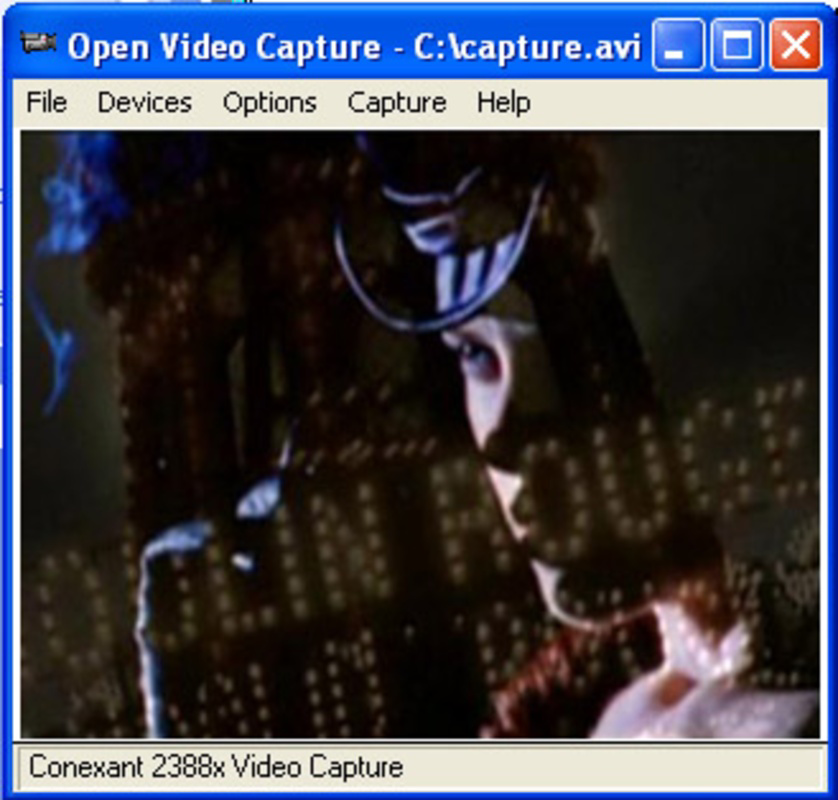
Description
Download Open Video Capture – video capture, webcam, TV tuner, digital camera, audio settings, compression codecs, still image extraction, live broadcast, video recording, screen recording
Overview
Open Video Capture is a specialized mobile application designed for users seeking a direct and efficient method of recording video from various digital sources. The app enables video capture from webcams, TV tuners, digital cameras, and similar devices, offering a streamlined solution for content creators, hobbyists, and individuals managing live video feeds. Its core purpose lies in bridging the gap between hardware sources and digital output, allowing users to record, preserve, and repurpose video content with minimal setup. The application is particularly useful for those who require real-time recording of live broadcasts, gaming sessions, or multimedia presentations without relying on complex desktop software.
Target users include amateur videographers, streamers, educators, and technical users managing analog or digital video inputs. The app’s ability to support multiple device types positions it as a flexible utility within the mobile video ecosystem. While the developer did not provide additional background information, the app’s longevity—released in 2010—suggests a stable, niche-focused tool that has maintained relevance through consistent functionality. Real-world use cases include capturing educational lectures from external cameras, recording live sports via TV tuners, or extracting key moments from video streams for social media content. Despite its age, Open Video Capture remains a viable option for users needing basic video capture functionality on Android devices.
Key Features & Functionality
- Multi-Device Video Capture: Supports video input from webcams, TV tuners, and digital cameras, enabling users to record content from a wide range of analog and digital sources.
- Customizable Output Settings: Offers control over compression codecs, video resolution, and audio configurations, allowing users to tailor output quality to specific project needs.
- Still Image Extraction: Enables users to capture high-quality still images from recorded video files, useful for creating thumbnails or preserving significant visual moments.
- TV Tuner Programming: Includes scheduling features for automatic recording of live broadcasts, ensuring users don’t miss desired content without manual monitoring.
- Direct Video Streaming Capture: Facilitates real-time recording of video feeds, ideal for capturing live events or continuous monitoring sessions.
For example, a content creator using a USB webcam can connect it to an Android device and use Open Video Capture to record a tutorial session with custom audio levels and compression settings. Similarly, a user with a TV tuner can schedule recordings of evening news or sports events, ensuring automatic capture without active supervision. The still image extraction feature allows users to pull frame-accurate screenshots for use in documentation or social media posts. These capabilities make the app particularly valuable for users managing external video sources on mobile platforms, where such functionality is often limited.
Interface, UX & Performance
The user interface of Open Video Capture is designed with functionality over aesthetics, reflecting its utility-focused nature. The layout prioritizes accessibility to core controls such as start/stop recording, device selection, and output settings. Navigation is straightforward, with a linear flow from device input selection to recording initiation and file management. While the visual design lacks modern polish, it remains legible and responsive across various screen sizes and resolutions.
Performance is consistent with the app’s age and minimal resource footprint. Although the developer did not list formal performance metrics, the app’s 12.5 MB file size suggests optimized code and low overhead. It operates efficiently on mid-range Android devices, handling video input from connected peripherals without significant lag or crashes. Responsiveness during recording sessions appears stable, though real-time preview quality may vary depending on the source device and system load. The app maintains stability during extended recording sessions, a critical factor for live broadcast capture. Users should expect a functional but dated experience, suitable for basic tasks but not intended for high-end multimedia editing.
Platform Compatibility & Technical Requirements
Open Video Capture is available exclusively on the Android platform, making it accessible to users with compatible devices. The app runs on Android systems, though specific minimum OS version requirements were not listed by the developer. Given its release date in 2010, the app may function on older Android versions, but compatibility with modern devices is not guaranteed without further testing. The application’s file size is 12.5 MB, indicating a lightweight installation that does not strain storage space on most smartphones or tablets.
Users should verify device compatibility with external video sources such as USB webcams or TV tuners, as support depends on the Android device’s hardware capabilities and driver availability. The app does not specify supported video formats or codecs beyond general compression options. The developer did not disclose any specific hardware or software prerequisites, so users are advised to test the app with their intended setup before relying on it for critical tasks.
Pros and Cons
Pros
- Supports multiple video input sources including webcams, TV tuners, and digital cameras.
- Offers customizable compression codecs and audio settings for tailored output quality.
- Includes still image extraction from recorded videos for content reuse.
- Provides scheduling features for automatic TV tuner recordings.
- Lightweight installation at just 12.5 MB.
- Free to download and use with no in-app purchases.
Cons
- Interface design is outdated and lacks modern UI elements.
- No official documentation or support channels provided.
- Compatibility with current Android devices and hardware may be limited.
- Performance on high-end devices may not fully leverage available processing power.
- No visible update history or recent development activity.
FAQ
Is Open Video Capture safe to download and use?
Yes, the app is free and available from official Android sources. As with any third-party app, users should ensure they download it from trusted platforms to maintain device security.
Can I use Open Video Capture with my USB webcam?
Yes, the app supports video capture from USB webcams, provided the Android device has USB OTG functionality and the webcam is compatible with Android’s video input system.
Does Open Video Capture support screen recording?
No, the app is designed for capturing video from external devices, not for recording the device’s screen.
How do I schedule a recording with a TV tuner?
Using the built-in programming feature, users can set recording times and preferences for live broadcasts, allowing automatic capture without manual intervention.
Is Open Video Capture regularly updated?
The developer has not provided any update history or release notes. The app’s last known release was in 2010, so it may not receive future updates.
Final Thoughts + CTA
Open Video Capture remains a niche yet functional tool for users needing to record video from external sources on Android devices. While its interface and development pace reflect its age, the app delivers core functionality with reliability and efficiency. Its support for webcams, TV tuners, and digital cameras, combined with customizable output and still image extraction, makes it a valuable utility for content creators, educators, and technical users. Though not suited for modern multimedia workflows, it fills a specific gap for those managing analog or digital video inputs without desktop software.
For users with older Android devices or specific hardware setups requiring video capture from peripherals, Open Video Capture offers a lightweight, free solution. Its long-standing presence in the ecosystem speaks to its stability and utility, even in a rapidly evolving mobile landscape. If you require a straightforward tool for recording live video feeds, capturing broadcast content, or extracting stills from recordings, this app remains a viable option.
Download Open Video Capture now
Guides & Tutorials for Open Video Capture
How to install Open Video Capture
- Click the Preview / Download button above.
- Once redirected, accept the terms and click Install.
- Wait for the Open Video Capture download to finish on your device.
How to use Open Video Capture
This software is primarily used for its core features described above. Open the app after installation to explore its capabilities.
User Reviews for Open Video Capture 0
No reviews found


